Business Card Printing UK: What to Check Before Ordering
Ordering business cards may seem straightforward, but the choices you make before sending your artwork to print can affect how professional, readable and useful the finished cards are. From the card size and design to the artwork file, quantity and final proof, it is worth checking the important details before placing an order.
For businesses looking for business card printing UK services, the goal should be simple: prepare accurate artwork, choose an option that suits your business, check the final details carefully and make sure the finished cards represent your brand clearly.
iFix Prints offers Standard and Premium business cards, with the current business-card page confirming a standard UK size of 85mm × 55mm. It also accepts print-ready PDF, PNG and JPG files and provides design support for customers who need help preparing their cards.
What Should You Check Before Ordering Business Cards?
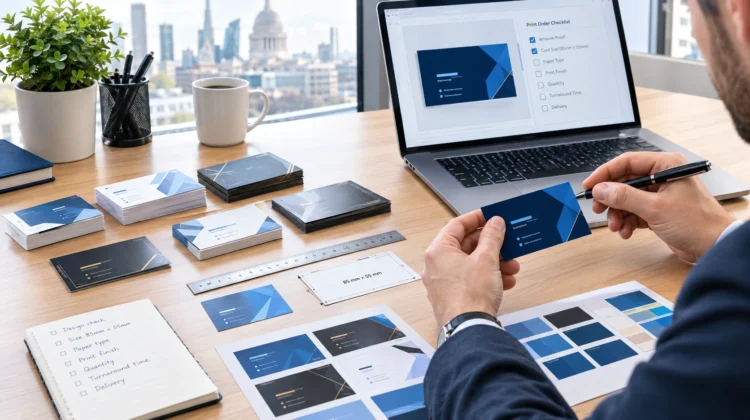
Before ordering business cards, check five main areas: size, information, artwork, printing options and proofing. These details help reduce avoidable mistakes and make sure your cards are ready for professional use.
A simple pre-order checklist includes:
- Confirm the finished card size.
- Check names and contact details.
- Make sure your logo and branding are correct.
- Prepare a suitable print-ready file.
- Choose between available card options.
- Decide how many cards you need.
- Proofread the final artwork before printing.
Taking a few minutes to check these areas can make the ordering process much smoother.
1. Check the UK Business Card Size
One of the first things to check when ordering business cards is the finished size.
iFix Prints lists 85mm × 55mm as its standard UK business card size, with both its Standard and Premium business-card options following this size.
Knowing the finished dimensions before preparing your artwork is important because your design needs to fit the final card correctly. Text, logos and other important information should be positioned carefully so the finished card remains clear and easy to read.
If you are designing the card yourself, check the printer’s artwork requirements before exporting the final file. Do not simply assume that every printer uses exactly the same artwork specifications.
2. Decide What Information to Include
A business card has limited space, so it is important to prioritise information rather than trying to include everything.
For most businesses, useful information can include:
- Your name
- Job title or role
- Company or brand name
- Logo
- Telephone number
- Email address
- Website
- Other relevant contact information
The information should be easy to understand at the actual printed size. A clean layout is generally more useful than filling every available area.
Your business card should also match the wider visual identity of your business. Consider using the same logo, colours and typography that customers see on your website, stationery and other marketing materials.
3. Prepare Your Artwork Correctly
Good business card printing starts with suitable artwork.
iFix Prints currently accepts PDF, PNG and JPG files for business-card printing. Customers can also request design assistance if they do not already have a suitable print-ready file.
Before uploading your design, check:
- Your name is spelled correctly.
- Telephone numbers are accurate.
- Email addresses are correct.
- Your website address works.
- Your logo is the intended version.
- Colours and branding are consistent.
- Text is readable at the final card size.
- No important information has been accidentally omitted.
If someone else has prepared your artwork, it is still worth checking every piece of information yourself before approving the final design.
4. Choose the Right Business Card Option
The right business card option depends on how you want the finished card to represent your business.
iFix Prints currently provides two main business-card options: Standard Business Cards and Premium Business Cards.
Standard business cards are positioned as an affordable option for everyday business use. Premium business cards are described as a higher-end option with thicker stock and upgraded finishes.
Think about how the cards will be used before making your choice.
For example, a business that regularly distributes large numbers of cards may have different requirements from a professional who gives a card to a client during an important meeting.
The important point is to select an option that matches your practical requirements and brand presentation rather than choosing an option based only on appearance.
5. Think About Quantity Before Ordering
The number of business cards you order should reflect how you expect to use them.
Consider:
- How many people in your business need cards?
- Will cards be used at meetings or networking events?
- Are you preparing for an upcoming exhibition or event?
- Do you regularly give cards to customers?
- Are your contact details likely to change soon?
It is also sensible to check your artwork before ordering a large quantity. If a telephone number, email address or website URL changes shortly afterwards, previously printed cards may no longer contain the correct information.
For businesses that expect their details to remain unchanged, ordering a suitable quantity can make the printing process more convenient.
6. Always Proofread Before Printing
Proofing is one of the most important steps in business card printing.
A small spelling mistake on a business card can be surprisingly inconvenient because the incorrect information is reproduced across the entire order.
Before approving your artwork, carefully check:
Name:
Is the spelling correct?
Job title:
Does it accurately describe the person’s role?
Contact details:
Are the telephone number and email address correct?
Website:
Is the URL accurate?
Branding:
Are the correct logo and brand elements being used?
Layout:
Is everything readable and properly positioned?
A final proof check is especially important when several people have been involved in preparing the artwork.
7. Make the Design Work for Your Business
Business card design should support the purpose of the card.
A professional service business may want a simple layout that gives priority to contact information. A creative business may use a more distinctive visual style. A retail or hospitality business may want to connect the card with its wider promotional materials.
There is no single design that works for every business.
What matters is that the finished card is easy to understand and consistent with your existing branding.
If you do not already have suitable artwork, iFix Prints also provides design support. Its design service describes a process that involves customers from the initial brief through proofing and final print preparation.
How to Order Business Cards from iFix Prints
The ordering process can be kept simple:
- Decide what you need – Choose the appropriate business-card option.
- Prepare your information – Check names, roles and contact details.
- Prepare your artwork – Upload a suitable PDF, PNG or JPG file.
- Request design support if needed – Design assistance is available if you do not have a print-ready file.
- Check the final details – Proofread the complete design before printing.
- Place the order – Once the artwork and requirements are confirmed, proceed with printing and delivery.
The iFix Prints business-card page currently states that orders are typically printed within 2–3 working days, while delivery depends on the selected shipping method.
Frequently Asked Questions
What size are UK business cards?
The standard UK business card size listed by iFix Prints is 85mm × 55mm. Both its Standard and Premium business-card options follow this size. Always check the printer’s current artwork requirements before preparing your final file.
What should I include on a business card?
A business card will commonly include your name, job title, company or brand name, logo, telephone number, email address and website. Only include additional information when it is genuinely useful and can remain readable at the finished card size.
What file formats does iFix Prints accept?
The iFix Prints business-card page states that customers can upload print-ready designs in PDF, PNG or JPG format. If you do not have a suitable design file, iFix Prints also offers design assistance.
Should I choose Standard or Premium business cards?
It depends on your requirements. iFix Prints describes Standard Business Cards as an affordable option for everyday use, while Premium Business Cards offer thicker stock and upgraded finishes. Consider how and where the cards will be used before choosing.
How long does business card printing take?
According to the current iFix Prints business-card page, orders are typically printed within 2–3 working days. Delivery time depends on the shipping method selected.
Can I get help designing my business cards?
Yes. iFix Prints states that design support is available for customers who do not have a print-ready file. Its design service also describes support from the initial brief through proofing and print-ready preparation.
What should I check before approving business card artwork?
Check the spelling of names, job titles, telephone numbers, email addresses and website URLs. Also check the logo, branding, layout and readability before approving the final artwork for printing.
Final Thoughts
Choosing business card printing UK services is not simply about uploading a design and selecting a quantity. Before ordering, check the finished size, prepare accurate contact information, use an appropriate artwork file and choose a business-card option that suits your needs.
Most importantly, proofread the final design carefully. A well-prepared business card gives customers a clear way to remember and contact your business while keeping your printed branding consistent.
By checking these details before placing an order, you can make the printing process more straightforward and reduce the risk of avoidable artwork or information errors.